Joe Wainer

Updated 5 months ago

The ultimate protection against viruses

Kaspersky Anti-Virus is the new edition of the well-known antivirus program, now with a more powerful engine, a revamped style, better usability, and greater protection against online dangers. 

Turn your computer into a fortress

Kaspersky Anti-Virus  intercepts, blocks and removes viruses, worms, trojans, spyware, keyloggers, rootkits and other types of malware.

The real-time protection is excellent with files, emails and Internet traffic getting filtered effectively. The program also protects against phishing by identifying and blocking links to sites that have been infected with malware.

Kaspersky Anti-Virus also includes a self-defense mechanism that blocks files that are acting weird, useful for preventing attacks from potential malware that hasn't yet been recognized by the database. On top of that, this new version of Kaspersky provides additional protection against ransomware.

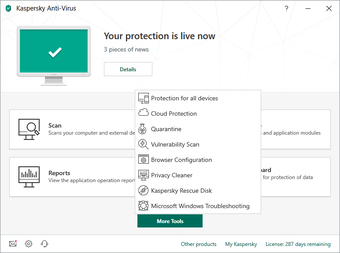
In the Tools section of Kaspersky Anti-Virus , you can find some very useful system security options:

  • Vulnerability scan: identifies flaws in the system or in any third-party apps you have installed, allowing you to immediately repair any problems; 
  • Kaspersky Rescue Disk: creates a bootable CD or USB drive with the engine;
  • Windows Troubleshooting: analyzes the system and repairs any problems caused by malicious software;
  • Privacy Cleaner: cleans the system of unnecessary files (cookies, cache, log etc.);
  • Browser Configuration: analyzes your Internet Explorer settings and suggests ways to optimize security (this tool is incompatible with other browsers);
  • Cloud Protection: provides immediate protection against new threats as well as real-time information about the security and reputations of the web sites you visit.

Finally, KAV has introduced a new feature that automatically updates the program to the latest version available. 

A new design

Kaspersky has a renewed design: this new version is dedicated to efficiency with a sharper and more user-friendly interface.

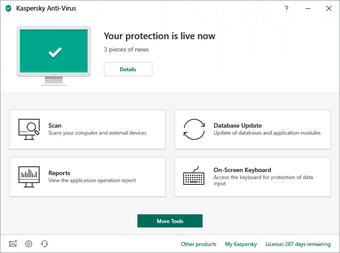
The main screen shows the protection status of your computer and provides easy access to the most important areas: scans, updates, reports and a virtual keyboard. Additional options can be accessed by clicking on the Show Additional Tools button.

The basic configuration of Kaspersky Anti-Virus is excellent for most users. More experienced users can personalize their configuration by going to the Settings menu (not visible in the interface). 

A powerful and reliable anti-virus, but with no significant changes

Kaspersky Anti-Virus (KAV) is one of the most popular antiviruses on the market. The antivirus scanning engine is among the best available and its new design makes it even more user-friendly.

As far as new features go, there aren't really any big innovations in the last version, but the tools and options have been generally improved, along with the antivirus performance.

KAV consumes less resources compared to the previous edition, but it still has a long way to go in that respect. Although it is a great antivirus, it works better when used on computers with good hardware. 

Joe Wainer

    Joe Wainer is a content writer with a strong interest in technology and software. He enjoys exploring new apps, games, and tools, translating his findings into reviews that are clear and accessible. His background also includes coding projects, adding practical insight to his evaluations.

    • Pros

      • Clear and user-friendly interface
      • Very powerful engine
      • Recovery features (rollback)
      • Highly configurable
      • Improved performance
    • Cons

      • Long Installation
      • Memory consumption could be improved
      • Not many essential new features
     0/5

    App specs

    Program available in other languages


    User reviews about Kaspersky Anti-Virus

    3.9

    12 reviews

    Add review

    Main reviews for you

    • Anonymous user

      I hope better to my computer now, thank you kaspersky....and will better before

    • Anonymous user

      I believe its the best anti virus app and it can satisfy my needs in my new computer

    • Anonymous user

      It's giving us very good results for both browser and file protection. Having used the multi user licence now for 14days, it's giving us very good results for both browser and file protection

    • Anonymous user

      The best anti-virus I have used for 5 years. I have used Kaspersky for 5 years. And now I keep using it. During 5 years up to now, my computer is safe. And I don't want to change any others antivirus Pros: Smart FirewallPhishing link blockedNew virus fast detected Cons: Start slowlyUpdate too slow

    • Anonymous user

      Best to use antivirus. superb and detects any kind of threats.a must have a.v.good anti spyware,firewall,anti phishing,and it doesn't slows down your p.c.

    • Anonymous user

      KASPERSKY ROCKS.. Kaspersky is in my family for years and never had to deal any virus at all.The best antivirus. Pros: the antivirus block-firewallphising url protectionsite advisorvirtual keyboardtools Cons: protection starts slowly so startup viruses may evadesome viruses cant be deleted so kaspersky spams em and i have to delete em by myself

    More

    You may also like

    Alternatives to Kaspersky Anti-Virus

    Explore Apps

    Related Articles

    Latest articles

    Laws concerning the use of this software vary from country to country. We do not encourage or condone the use of this program if it is in violation of these laws. Softonic may receive a referral fee if you click or buy any of the products featured here.
    Softonic

    Is Kaspersky Anti-Virus safe?

    100/100

    Score result: Clean

    This file passed a comprehensive security scan using VirusTotal technology. It is safe to download.

    • Virus free
    • Spyware free
    • Malware free
    • Verified by Security Partners

      VirusTotal logo

    Scan Info

    Last scan
    Monday, July 14, 2025
    Scan provider
    VirusTotal · Full report

    File Integrity

    File
    Kaspersky_AntiVirus_V21.21.7.384.exe
    SHA256
    c0ebe5ea94a39e3be1c306c376e35e208c7b3a0c18ed2e3dedd4d4befb8659b3
    SHA1
    b86fdd9f0012e55281856f40660b99c7ff3abda4

    Softonic security commitment

    Kaspersky Anti-Virus has been thoroughly scanned by our advanced security systems and verified by industry-leading partners. This file comes from the official developer and has passed all our security checks, showing no signs of viruses, malware, or spyware. For more information, visit our Security and Trust Center